Pages

Friday, 15 September 2017

Understanding Camera Log & How It Can Improve Video Workflows

Video imaging techniques historically, have been a battle of compromise between quality and price point but the prosumer digital video market is finally showing signs of bargaining power. In terms of image quality, raw offers unparalleled advantages because you are capturing sensor data rather than the video stream it produces, however, turnaround time or budget typically demand a more pragmatic approach to shooting. So how do you navigate your quality options offered in this extremely convoluted digital process, ravaged by misinformation? It's one part trial, one part error, and an undetermined amount of personal preference. Me? I shoot log.
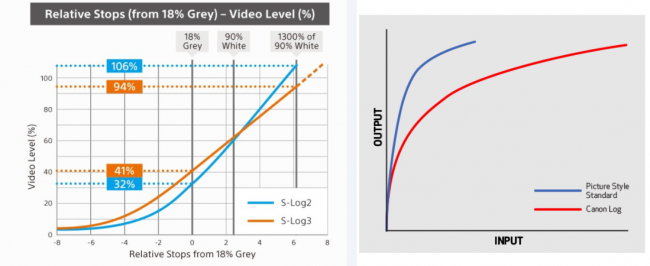
Log Details, provided by their manufacturer.

What is Log?

Ranging from a picture profile to an actual shooting mode from one manufacturer to the next, log refers to a number of proprietary video recording options that improve the latitude and dynamic range of a digital camera. By converting linear data into a gamma curve, log captures a video stream that aims to replicate a raw capture of the highlight and mid-tone response from a camera sensor for exposure and color management. These algorithms skip some of the in-camera video processing steps to reduce or completely lock out certain luma and chroma details within a compressed file. In simpler terms, shooting in log offers a post-production flexibility similar to Raw, but in a much smaller file size. The shooting style is not a shortcut by any means, but it does create a flat, more workable color matrix, taking the creative control from the camera and giving it to the editor.

Luts

For those new to log, it can be hard to trust that the desaturated footage seen on the live view could actually be useable. I've spent a number of shoots defending my creative decisions because the playback footage appeared to be sub par and the client couldn't envision the final product. Fortunately, camera, recorder, and monitor manufacturers have developed a workaround called a lut, short for lookup table. The lut works like an image overlay that calibrates the color space or bit depth of the viewable, live image without baking the information into the actual video file. While a lut does not replace color correction, it is a useful tool for anyone wanting to see what the deliverable footage should look like once color corrected, while still on set.

Who Should Use Log?

Log is not necessarily appropriate for all video occasions. It isn't something that is widely seen in sporting events or other types of live situations. Learning to calibrate the colors of a digital image can be time-consuming and requires some software and monitoring solutions.

Those willing to learn the trade, however, will see an immediate boost to their bank. Colorists and Digital Imaging Technicians can account for a large chunk of a production's budget. As software becomes less expensive and log more common, the need for these dedicated roles is reduced. With a little patience, practice, and a well-calibrated monitor, any videographer can create stunning cinematic, digital images, even on an entry-level budget.

Can I Shoot Log on my DSLR or Mirrorless System?

Once exclusive to high-end camcorders, log is quickly becoming a standard for more affordable DSLR and Mirrorless systems; but are all of these color gamuts created equally? From price point to overall utility, I tested three of the top digital camera manufacturer's flagships side-by-side to help shooters determine which camera system might be right for his or her next shoot.

Panasonic GH5 with V-Log Upgrade

How to Log in a Panasonic GH5

I've been a long time admirer of Panasonic, specifically, for the video interest technology they build into their mirrorless system cameras. While I generally prefer to shoot with a full frame sensor, Panasonic has clearly defined their target market and deliver professional image quality on an unprecedented price tier.

The Panasonic GH5 with V-Log, with a current MSRP falling just under $2100, is the most affordable option on my list. Calling it a V-Log upgrade is a bit of a misnomer, as it implies that true V-Log, the Varicam gamma response, is available for shooting. Unfortunately, there just isn't enough camera to pack in that much technology. Like the GH4, the GH5 is upgraded to V-Log L, which is short for Variam Log Lite.

To engage V-Log, you'll need to navigate through the not-so-clearly stated submenu of "Photo Style." After advancing through a few built-in gamma profiles, you will finally find "V-Log L." Selecting V-Log L will automatically lock out any adjustment options for the master pedestal, contrast, hue, and saturation, as the algorithm bypasses most of the in-camera image processing. The new gamma curve gives you a locked neutral image, protecting the user from making changes that could compromise the quality of the overall footage.
Panasonic GH5 Log System

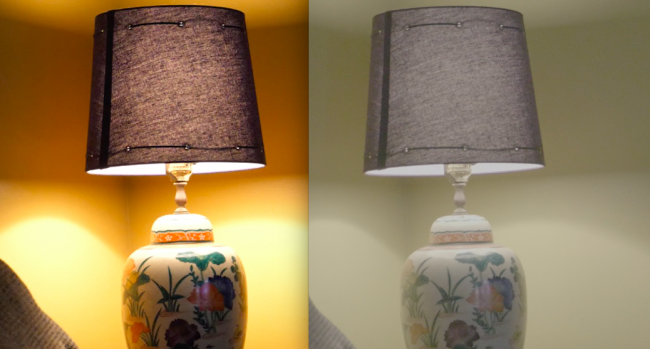
The image on the left represents standard camera processing from the GH5. The image on the right is the pre calibrated image using log.

When shooting in V-Log L the camera's dynamic range is expanded to 12 stops over the standard 10. This dynamic range expansion does not come without challenges. When shooting internally, it is important to maintain proper exposure to avoid instances of banding or digital artifacts that can result from sensor limitations when paired with a log technology designed as a more expansive recording option on a much larger camera. GH4 users occasionally reported such complications but I was unable to recreate them with the Panasonic GH5. Improved recording capability may have circumvented these issues but I wouldn't rule out the occurrence possibility in some settings. At any rate, Panasonic seems to be aware of these complaints and rather than amending V-Log L, they appear to be rising to the occasion, improving in-camera reliability.

Sony A7sII

Understanding S Log Video Format

The only camera on my list that doesn't require an upgrade to enjoy the benefits of log technology, the Sony A7sII is a powerhouse camera with a mere $2499.99 MSRP. When Sony introduced their highly revered S-log recording option to the A7 camera line, it substantially changed the digital camera market. Offering a gratuitous recording option to a camera at a semi-professional price point was enough to launch Sony into a new echelon of respect and profit from videographers, leaving most major manufacturers arduously trying to figure out how to compete.

Like the Panasonic GH5's V-Log L, Sony log is activated by applying a picture profile. Sony gives the user more choices for gamma curve preferences than Panasonic by way of S-Log2 and S-Log3. There are subtle differences between the two but S-Log3 is generally regarded as the most neutral of the two and offers an additional "cine" gamut option. Many shooters new to S-Log may notice an unusually high level of noise in their footage. Sony recommends overexposing your shot by as much as one to two full stops to fully capitalize on the color science.

Sony's Log profiles are easily the most complicated among the cameras I tested and are clearly intended for higher-end video work when compared to the Panasonic GH5 and Canon 5D IV. With so much image control taken away from the camera, the operator and editor are expected to process the footage in a way that may supersede the experience or interest of a semi-professional shooter. Pre-shooting tests are highly recommended as the sensor data translates skin tones in a way unique to Sony. The expanded dynamic range treats subtle highlight details differently at different stops with the first five stops generally considered to be where the magic happens. The color space has a tendency to err on the side of unnatural hues for skin-tones but the curves allow for some of the most workable footage in terms of matching to other cameras, even models made by competing manufacturers. S-Log comes with more commitment requirements if a shooter truly wants to master the craft but for the pric e point, it captures an image comparable to high-performing camcorders with much steeper price points.
Sony a7sII Log Side by Side Comparison

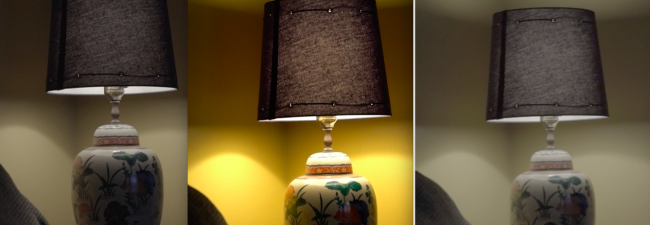
The center image represents standard in-camera processing. The image to the left was shot using S-Log2. The information is still pretty clear but much of the chroma information has been removed. The image on the right was shot using S-Log3, which maps the chroma and luma information uniquely, resulting in an extremely flat image.

Canon 5D IV with C-Log Upgrade
Canon 5D Mark IV C Log Upgrade

The Canon 5D Mark IV with C-Log with a current MSRP of approximately $3399 is the most expensive camera on my list and the one I was the least familiar with when I began researching this project. Due to the strength of Canon's existing color science in DSLRs, I have never been completely convinced that cameras like the Canon 1D C and 5D Mark IV really need to be able to shoot log. Advertised by Canon as a profile that can create a "cinematic look similar to what can be achieved with Cinema EOS Cameras" and promised as the perfect "B" camera to the more video capable Canon C300 Mark II and Canon C700, I was a little underwhelmed by the light version of C-Log.
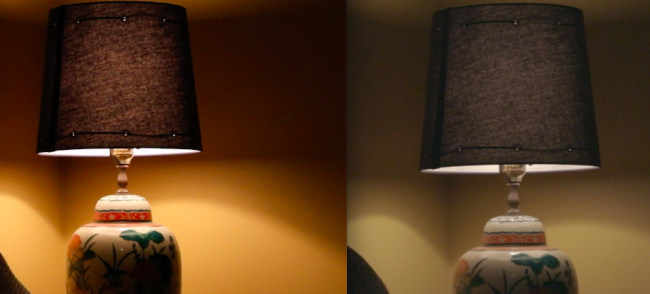
Canon Log Side by Side comparison

The image on the left was shot using Canon's standard color space. The image on the right was shot using log with a strength value of 5.

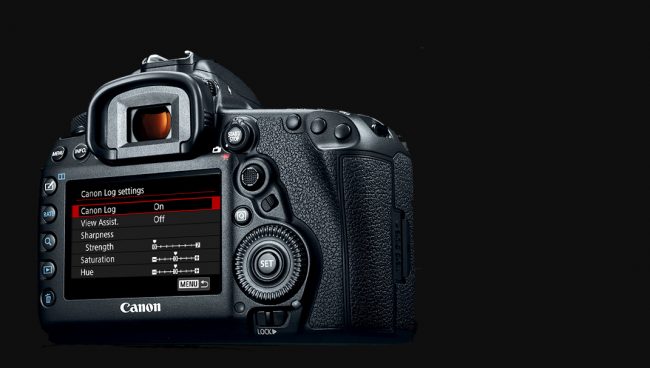
Only available when shooting in manual mode, setting up to shoot in C-Log is a simple and straightforward process. Once log is active, an operator is given the option of incrementally tweaking the strength, saturation, and hue of the curve but the 5D IV does not offer the extensive customization options found in camcorders like the Canon C300 Mark II or Canon C700. A lut is engaged in tandem with the gamma curve change as a "view assist." This reverts the onboard live view display's image into a visual representation of a broadcast standard, BT.709 calibration.

C-Log in the Canon 5D Mark IV came across as more gimmick than a practical application. With some Canon camcorders offering 4:2:2 10-bit and 4:4:4 12-bit recording in camera, the video capabilities of the Canon 5D IV are pale in comparison, even with this log upgrade. For web based platforms, the 5D IV might make an excellent "B" camera to the more rugged camcorders, especially when on a budget, but chances are you'll be correcting to match the DSLR. Color correcting should be simple since the curves are based on the same proprietary technology but Canon may be pushing a little too hard for a Canon-centric ecosystem. At the 5D IV price point, there are more cost effective options to create beautifully, color corrected images.

The biggest downfall here is the implementation of motion jpegs. Log is built upon a foundation of image quality and file size workability. There are few less efficient compression and sampling methods than the corpulent motion jpeg file format. As technology improves, other manufacturers are packaging their video streams in smaller file structures that result in a comparable deliverable. It seems like Canon is still trying to find their place in current digital video trends and may have, once again, missed the opportunity to recover their former enthusiasts, lost to manufacturers who appear to be more actively responsive to the needs and requests of their customers.

Author: Ally Aycock

My name is Ally and I am a Senior Video Technician at Lens Rentals. I'm a freelance veteran in almost every production department and a total gear nerd. When I'm not producing or directing commercials and music videos, I like to take advantage of my free time by oversharing pictures of my dog on Instagram.


Source: Understanding Camera Log & How It Can Improve Video Workflows

Thursday, 14 September 2017

A week with Hasselblad's agile medium-format mirrorless camera

The X1D came along just before rival Fujifilm's $6,495 GFX-50S, and to me, the sleeker Hasselblad has more allure. The tight all-aluminum body is built in Sweden, and has unique details like a battery cavity with no cover. Instead, the battery forms its own "door," via a built-in weatherproofing gasket. Another quality touch: The dual-SD card (UHS-I) ports and HDMI/USB 3.0/Headphone/Mic inputs have solid, precise aluminum doors, unlike the flimsy ones found on many DSLRs.

While the X1D is about the same weight as a full-frame DSLR, it's a relative featherweight in its category. Another Hasselblad model, the H6D-50C reflex camera, has the same sensor as the X1D, but weighs 2.1 kilograms (4.7 pounds!) compared to the X1D's 725 grams (1.6 pounds). That means you can easily carry it on location and still get the benefits of a huge sensor.

The 50-megapixel X1D has about the same resolution as Canon's 5Ds, but can theoretically gather more light thanks to the medium-format sensor. That also gives it a shallower depth of field, but unfortunately, that's limited by the current lens selection (more on that shortly).

The X1D uses a leaf shutter with 1/2000th of a second max speed, which sounds slow, but is faster than other medium-format cameras. You can sync a flash to any shutter speed, rather than being limited like most DSLRs -- a key feature for portrait shooters. A recent firmware update introduced an electronic shutter, which reduces vibration and allows up to 1/10,000th of a second speeds.

There's a pair of physical dials to adjust shutter speed and aperture, a mode selector dial, an ISO/white balance button, and a manual/autofocus button. The rear 3.0-inch TFT touchscreen, while a bit laggy, has nice image quality. It lets you set the camera's controls via an intuitive menu system that puts more established mirrorless camera makers (ahem, Sony) to shame. The electronic 2.36-megapixel viewfinder (EVF) is bright and clear.

Hasselblad only gave me one lens with the X1D, the f/3.5 45mm prime, equivalent to about 35mm and f/2.9 (for depth of field) on a full-frame camera. The lens produces some vignetting (correctable by Hasselblad's Phocus software) but is otherwise sharp.

The lens was a bit slow and had less depth of field than I want for low-light urban shooting. Hasselblad has three other lenses for the X1D -- the XCD 30mm f/3.5, 90mm f/3.2 and 120mm f/3.5, but nothing faster yet. It also has three more coming, including a zoom and macro, but has yet to release the full specs. For now, the extreme depth-of-field and low-light potential of its medium-format sensor is hampered by the available lenses.

Taking $11,290 worth of camera equipment (including the lens) into Paris was nerve-racking, but I got used to it quickly. It's simply a wonderful camera to carry around -- it weighs a less than my Canon 7D and the rubberized grip is fantastic.

The startup time is around 11 seconds, which is, frankly, terrible. If you want to be spontaneous, you can reduce that by putting it into sleep mode, but that drains the battery quicker. And battery life is not great to begin with -- after four or so hours of intense shooting, it died on me. The camera also gets quite hot after extensive use.

I usually stress about learning settings on new cameras, but I was quickly shooting on the X1D with no issues. The main controls (aperture, shutter speed, ISO and white balance) are handled by the dials and buttons, and everything else can be accessed quickly on the responsive touchscreen.

You can shoot at 3 fps, reasonable for a camera that produces 105MB images, but far from Canon, Nikon and Sony full-frame models (it's comparable to Fujifilm's GFX 50S, but the latter camera starts much quicker). The LCD/EVF blacks out for about a second while shooting, and the leaf shutter makes two dramatic clicking sounds, once to take the image, and again to reset. That means it might not be appropriate at sensitive events unless you use the quieter electronic shutter.

RAW images average 105MB each, and JPEG's are limited to previews. You'll need to have a decent computer and fast SD cards, but the payoff is 16-bit RAW "3FR" files with more tonal values than most DSLRs. Hasselblad claims a stellar 14-stops of dynamic range.

One thing I didn't expect was running out of space on the (skimpy) 16GB card that Hasselblad supplied with the demo unit -- it can only hold about 150 of those crazy large images. I found myself deleting photos while shooting like it was 2007, but it did force me to be more choosy about shots.

Low-light capability is excellent, despite what seems like a fairly limited maximum ISO (100-25,600). Hasselblad must have been conservative with those figures, because the top one or two settings are still usable, in my opinion. At anything up to about 3200 ISO, noise was not an issue.

The contrast-detection autofocus is reasonably fast and accurate, though nothing like systems from Sony or Canon. It can fail in low-light situations and is not great at tracking fast-moving subjects, so this is not a sports camera. On the plus side, you can select numerous points using the touchscreen, making it easy to control focus. The auto white balance worked well, whether indoors or out.

I deliberately shot from dusk until dark, both to test the X1D's low-light capability and because that's the best time to shoot, in my opinion. I was soon confidently snapping scenes with both bright lights and dark shadows, knowing that the RAW images had the latitude to deal with it. I was particularly impressed how it handled a shot of Paris' brightly-lit Pantheon, with tourists in the much darker foreground.

I did take some video, and unfortunately, the X1D can only shoot at 1080p/25fps. However, at least it has microphone and headphone inputs, unlike most mirrorless cameras (Sony's A7 models being a notable exception). You can't compare the video quality to, say, a 4K GH5 or Sony A7S II, but the larger sensor does give the footage an interesting look. For instance, at f/3.5, people in the foreground were pin sharp while the background was lightly blurred, creating a mild tilt-shift look.

In the end, I found that the X1D has fewer tradeoffs than possibly any other medium-format camera. Still, why get it instead of more capable full-frame models like the Sony A7R II or Canon 5Ds? The payoff is in the images. With shots I originally thought were too dark, I was able to fully recover shadow details. Over-exposed shots can also be pulled back with details that you thought were blown out (see the images at the end of the gallery, above).

The relatively high resolution makes it possible to crop images down to a quarter of what I shot and still blow them up to poster sizes. Colors and skin tones render accurately right out of the camera and require little, if any, tweaking. The transitions between tones and colors are gentle and natural. In short, the images are stellar right out of the camera, and skilled art, fashion and landscape shooters can get even more out of them in post-production.

Neither you nor I will likely buy this camera, so why look at it? It's simply an interesting, groundbreaking product with features that may wind up in more affordable consumer cameras. Thanks to smartphones, photography is evolving at the fastest rate in its 180-year history, and bleeding-edge models like the X1D can give us clues as to what's next.


Source: A week with Hasselblad's agile medium-format mirrorless camera

Wednesday, 13 September 2017

The Sony RX10 IV is a Fixed-lens Handheld Camera That Can Take Some Incredible Action Shots

Sony has been doing some terrific work with their mirrorless interchangeable lens cameras, but they haven't forgotten about their fixed-lens lineup. The RX10 is getting a refresh today with the announcement of the RX10 IV, which adds some pretty impressive autofocus and continuous shooting features to what was already a pretty impressive handheld camera.

With the RX10 IV, Sony improved on the sensor developments they made with the RX10 II and the lens improvements they made with the RX10 III. The RX10 IV once again has a 20.1 MP Exmor CMOS 1.0″ stacked image sensor with their DRAM chip, the processor used to boost continuous shooting and slow-motion performance. The sensor is paired with Bionz X image processing and a fixed f/2.4-f/4 24 – 600 mm Zeiss Vario-Sonnar T* lens with extra-low dispersion. This year's camera has 315 phase-detect autofocus points.

That lens will enable some incredible macro and zoom shots, even when taking dynamic shots. The camera is ideal for taking pictures of auto races, nature, or sports — especially if you're not in a place to set up a tripod. As usual, Sony has added their optical SteadyShot image stabilization, which combined with the speed of the processor and lens allows for crystal-clear shots of high-speed targets. It can take stills at 24 frames per second for up to 249 frames, so if you desperately need to get a shot, it's a camera you should be able to rely on.

If you're opting for macro shots instead of snapping far-off high-speed events, the camera boasts a minimum focus distance of 72 cm, so you can get up close and personal with your subjects.

The RX10 IV has an autofocus lock speed of 0.03 seconds, allowing it to keep up with that high-speed action and create sharp stills. That also helps the camera take some great video. The camera can record in 4K at 24p or 30p and up to 120p in 1080p resolution, with slow-motion capture up to 960p possible at lower resolutions for up to seven seconds. Sony also says the camera does full pixel readout during recording — not only does it not do pixel binning, it actually oversamples by 1.7x to create the final 4K images. As before, you can expect pro features like S-Log3/S-Gamut3, Gamma Display Assist, too.

The RX10 IV also features a backside touchscreen, an XGA OLED viewfinder, and Bluetooth connectivity.

Sony is packing all of this into a handheld camera that weighs about two pounds. The end result, once again, looks like a wonderful camera for pros who need a reliable, lightweight camera that can take razor-sharp handheld shots. And it is definitely for pros, considering the $1,700 price tag! If it fills a gap in your camera bag, the RX10 IV should be available sometime in October.


Source: The Sony RX10 IV is a Fixed-lens Handheld Camera That Can Take Some Incredible Action Shots

Tuesday, 12 September 2017

A week with Hasselblad's agile medium-format mirrorless camera

The X1D came along just before rival Fujifilm's $6,495 GFX-50S, and to me, the sleeker Hasselblad has more allure. The tight all-aluminum body is built in Sweden, and has unique details like a battery cavity with no cover. Instead, the battery forms its own "door," via a built-in weatherproofing gasket. Another quality touch: The dual-SD card (UHS-I) ports and HDMI/USB 3.0/Headphone/Mic inputs have solid, precise aluminum doors, unlike the flimsy ones found on many DSLRs.

While the X1D is about the same weight as a full-frame DSLR, it's a relative featherweight in its category. Another Hasselblad model, the H6D-50C reflex camera, has the same sensor as the X1D, but weighs 2.1 kilograms (4.7 pounds!) compared to the X1D's 725 grams (1.6 pounds). That means you can easily carry it on location and still get the benefits of a huge sensor.

The 50-megapixel X1D has about the same resolution as Canon's 5Ds, but can theoretically gather more light thanks to the medium-format sensor. That also gives it a shallower depth of field, but unfortunately, that's limited by the current lens selection (more on that shortly).

The X1D uses a leaf shutter with 1/2000th of a second max speed, which sounds slow, but is faster than other medium-format cameras. You can sync a flash to any shutter speed, rather than being limited like most DSLRs -- a key feature for portrait shooters. A recent firmware update introduced an electronic shutter, which reduces vibration and allows up to 1/10,000th of a second speeds.

There's a pair of physical dials to adjust shutter speed and aperture, a mode selector dial, an ISO/white balance button, and a manual/autofocus button. The rear 3.0-inch TFT touchscreen, while a bit laggy, has nice image quality. It lets you set the camera's controls via an intuitive menu system that puts more established mirrorless camera makers (ahem, Sony) to shame. The electronic 2.36-megapixel viewfinder (EVF) is bright and clear.

Hasselblad only gave me one lens with the X1D, the f/3.5 45mm prime, equivalent to about 35mm and f/2.9 (for depth of field) on a full-frame camera. The lens produces some vignetting (correctable by Hasselblad's Phocus software) but is otherwise sharp.

The lens was a bit slow and had less depth of field than I want for low-light urban shooting. Hasselblad has three other lenses for the X1D -- the XCD 30mm f/3.5, 90mm f/3.2 and 120mm f/3.5, but nothing faster yet. It also has three more coming, including a zoom and macro, but has yet to release the full specs. For now, the extreme depth-of-field and low-light potential of its medium-format sensor is hampered by the available lenses.

Taking $11,290 worth of camera equipment (including the lens) into Paris was nerve-racking, but I got used to it quickly. It's simply a wonderful camera to carry around -- it weighs a less than my Canon 7D and the rubberized grip is fantastic.

The startup time is around 11 seconds, which is, frankly, terrible. If you want to be spontaneous, you can reduce that by putting it into sleep mode, but that drains the battery quicker. And battery life is not great to begin with -- after four or so hours of intense shooting, it died on me. The camera also gets quite hot after extensive use.

I usually stress about learning settings on new cameras, but I was quickly shooting on the X1D with no issues. The main controls (aperture, shutter speed, ISO and white balance) are handled by the dials and buttons, and everything else can be accessed quickly on the responsive touchscreen.

You can shoot at 3 fps, reasonable for a camera that produces 105MB images, but far from Canon, Nikon and Sony full-frame models (it's comparable to Fujifilm's GFX 50S, but the latter camera starts much quicker). The LCD/EVF blacks out for about a second while shooting, and the leaf shutter makes two dramatic clicking sounds, once to take the image, and again to reset. That means it might not be appropriate at sensitive events unless you use the quieter electronic shutter.

RAW images average 105MB each, and JPEG's are limited to previews. You'll need to have a decent computer and fast SD cards, but the payoff is 16-bit RAW "3FR" files with more tonal values than most DSLRs. Hasselblad claims a stellar 14-stops of dynamic range.

One thing I didn't expect was running out of space on the (skimpy) 16GB card that Hasselblad supplied with the demo unit -- it can only hold about 150 of those crazy large images. I found myself deleting photos while shooting like it was 2007, but it did force me to be more choosy about shots.

Low-light capability is excellent, despite what seems like a fairly limited maximum ISO (100-25,600). Hasselblad must have been conservative with those figures, because the top one or two settings are still usable, in my opinion. At anything up to about 3200 ISO, noise was not an issue.

The contrast-detection autofocus is reasonably fast and accurate, though nothing like systems from Sony or Canon. It can fail in low-light situations and is not great at tracking fast-moving subjects, so this is not a sports camera. On the plus side, you can select numerous points using the touchscreen, making it easy to control focus. The auto white balance worked well, whether indoors or out.

I deliberately shot from dusk until dark, both to test the X1D's low-light capability and because that's the best time to shoot, in my opinion. I was soon confidently snapping scenes with both bright lights and dark shadows, knowing that the RAW images had the latitude to deal with it. I was particularly impressed how it handled a shot of Paris' brightly-lit Pantheon, with tourists in the much darker foreground.

I did take some video, and unfortunately, the X1D can only shoot at 1080p/25fps. However, at least it has microphone and headphone inputs, unlike most mirrorless cameras (Sony's A7 models being a notable exception). You can't compare the video quality to, say, a 4K GH5 or Sony A7S II, but the larger sensor does give the footage an interesting look. For instance, at f/3.5, people in the foreground were pin sharp while the background was lightly blurred, creating a mild tilt-shift look.

In the end, I found that the X1D has fewer tradeoffs than possibly any other medium-format camera. Still, why get it instead of more capable full-frame models like the Sony A7R II or Canon 5Ds? The payoff is in the images. With shots I originally thought were too dark, I was able to fully recover shadow details. Over-exposed shots can also be pulled back with details that you thought were blown out (see the images at the end of the gallery, above).

The relatively high resolution makes it possible to crop images down to a quarter of what I shot and still blow them up to poster sizes. Colors and skin tones render accurately right out of the camera and require little, if any, tweaking. The transitions between tones and colors are gentle and natural. In short, the images are stellar right out of the camera, and skilled art, fashion and landscape shooters can get even more out of them in post-production.

Neither you nor I will likely buy this camera, so why look at it? It's simply an interesting, groundbreaking product with features that may wind up in more affordable consumer cameras. Thanks to smartphones, photography is evolving at the fastest rate in its 180-year history, and bleeding-edge models like the X1D can give us clues as to what's next.


Source: A week with Hasselblad's agile medium-format mirrorless camera

Monday, 11 September 2017

FujiFilm X-E3 Mirrorless Camera with 4K Video Launched

FujiFilm X-E3 Mirrorless Camera with 4K Video Launched

FujiFilm just released their new X-E3, a mid-range mirrorless camera that is compact with the classic rangefinder style body. It remains affordable much like the X-E2 and X-E1 before it. However, the new X-E3 is now fully capable of 4K video recording. The X-E3 inherits several of the more expensive FujiFilm X-Pro2's features including a 24-megapixel APS-C X-Trans III sensor, and X-Processor Pro image signal processor. The new X-E3 also has the focus control joystick, exposure compensation and shutter speed dials. The 4K video recording capability is only on the X-E3 for now however, with the X-Pro2 receiving it in a few months via firmware update.

FujiFilm X-E3 Mirrorless Camera with 4K Video Launched

Although the rangefinder styling is similar to the X-E2 and X-E1, the new X-E3 removes much of the buttons at the back. In its place, is a touchscreen which has its pros and cons. Users who prefer tactile eyes-free controls for customizability will find the shooting process slower. There is no quick button to access for changing exposure modes. The ISO is also hidden deep in the menu settings as well.

Pricing and Availability

The X-E3 is now available for pre-order, shipping out towards the end of September. Three versions are available: body only, with 18-55mm f/2.8-4 zoom and 23mm f/2 prime. It will cost $899, $1,299 and 1,149 USD respectively. Just like with previous X-E1 and X-E2, buyers can choose between a classic silver-top or all-black color scheme.

FujiFilm X-E3 Feature Overview Video
Source: FujiFilm X-E3 Mirrorless Camera with 4K Video Launched

Sunday, 10 September 2017

New FUJIFILM X-E3, a rangefinder style ultra-compact mirrorless camera offers outstanding image quality and enhanced handling.

Utilising the X-Processor Pro for best in class color reproduction in both stills and 4K movies. Made for photographers who want to seamlessly upload photos directly to their smartphone or tablet.

September 7, 2017

FUJIFILM Corporation (President: Kenji Sukeno) has announced that it will release the FUJIFILM X-E3 (hereinafter "X-E3"), the latest addition to the X Series of premium mirrorless digital cameras on September 28th 2017.

The X-E3 features APS-C 24.3 megapixel X-Trans™* CMOS III sensor and the X-Processor Pro high-speed image processing engine. The X-E3 is the first X Series model to feature Bluetooth ®** low energy wireless communication. You can pair the camera with your smartphone or tablet device for easy transfer of pictures taken. The LCD monitor, on the back of the camera, uses a static touchscreen panel which supports the conventional "Touch Shot", "Touch AF" and "Focus Area Selection" capabilities. An all-new "Touch Function" feature will be available on the X-E3, which enables gesture control like flick and pinch zoom, to further enhance touchscreen operation. The AF algorithm has been updated to enhance the camera's performance for tracking a moving subject. The X-E3's premium exterior design, agility and functional beauty make it a mirrorless camera that is "a pleasure to own and fun to shoot with" at the same time.

<Key feature on the FUJIFILM X-E3>

[1] Compact and lightweight body for portability and practicality

Fujifilm redesigned the camera body of FUJIFILM X-E2, released in November 2013, to create the most compact and lightweight model within the X Series interchangeable lens camera range, with a viewfinder. The form factor makes it a perfect companion for everyday use and travel photography. The well-balanced proportions and the grip-shaped design make the camera comfortable to hold. The new model also supports the Focus Lever, a popular feature first introduced in the FUJIFILM X-Pro2, allowing you to instantaneously change the focus area while keeping eye on the viewfinder.

The top plate of the camera body features two dials, one for shutter speed and the other for exposure compensation. The dials, milled from aluminum, have a high quality appearance and deliver a reassuring click at every notched setting. The exposure compensation dial now has the C position to enable exposure compensation of up to ±5 stops in 1/3 steps, which enhances the basic operability of photography. The X-E3 is also equipped with an Auto mode selector lever for selecting the fully-automatic Advanced SR Auto mode where the camera chooses the optimum settings for a given scene.

[2] Outstanding image quality, high-speed response and upgraded AF tracking performance

The X-E3 features a 24.3 megapixel APS-C sized X-Trans™ CMOS III sensor and X-Processor Pro image processing engine for outstanding image quality and high-speed response. The X-E3 features a large phase detection AF area and an updated algorithm to deliver a fastest AF speed of 0.06sec.***. The X-E3 also offers 5.0fps live-view shooting, a quick start-up time of 0.4sec., a shutter time lag of 0.050sec. and a shooting interval of 0.25sec.*4

Thanks to the newly developed image recognition algorithm, the X-E3 is able to track subjects that are moving at twice the speed compared to the previous models*5. In addition, the X-E3 is also able to track moving subjects of half the size as before.

[3] Enhanced connectivity with Bluetooth® wireless communication

The X-E3 is the first X Series camera that offers Bluetooth® capability. Pair it with your smartphone or tablet device and easily transfer pictures you have taken to the smartphone or tablet device via the smart-device app "FUJIFILM Camera Remote."

[4] Upgraded intuitive touchscreen operation

The LCD monitor uses a high-resolution 1.04M dot, 3.0-inch static touchscreen panel display. The "Touch Panel Settings" on allows the following operations during shooting and playback modes:

<Shooting Modes>

  • Focus Area Selection: Move the focus point to the chosen position by tapping the LCD monitor.
  • Touch Shot: Touch to focus on a specific point, then take the picture. When you remove your finger from the screen, the camera will take a shot
  • <Playback Modes>

  • Swipe Movement : Swiping a finger across the screen scrolls through the images, one after the other.
  • Double-Tap Enlargement: Tapping the screen twice will enlarge the image, centering on the active focus point when the image was taken.
  • Drag : Moving a finger across the screen when an image is enlarged will move it around the frame.
  • Pinch out : Placing two fingers on the screen and widening the distance between them enlarges the image.
  • Pinch in : While the image being displayed is enlarged, placing two fingers on the screen and narrowing the distance between them reduces the image size and ultimately displays the last 9 images.
  • All the touchscreen functions are disabled when the "Touch Panel Settings" are turned off.
  • The camera also features the "Touch Function", in which you can use flick motions in up – down and right – left directions to call pre-assigned functions. Use the drag motion on the touchscreen panel, even while keeping your eye on the Electric View Finder (EVF), to change the focus area location. In the EVF TOUCH SCREEN AREA SETTINGS, you can activate touchscreen operation for "ALL", "RIGHT", "LEFT" or turn the functionality "OFF".

    [5] High resolution and high definition 4K video recording

    The X-E3 is capable of recording both Full HD and 4K video using the X Series' famous Film Simulation modes. You can output recorded video to an external monitor, via the HDMI port, and input audio from an external microphone.

    [6] 25 high-performance FUJINON X-mount lenses for ultimate versatility

    Our XF lens line-up now features 25 lenses, after today's announcement of the FUJINON XF80mmF2.8 R LM OIS WR Macro. The current line-up of lenses range from ultra-wide-angle to super-telephoto and includes five fast aperture prime lenses. These lenses bring out the very best image quality from the X-E3. Optional accessories such as mount adapters and macro extension tubes further broaden photographic potential.

  • * X-Trans™ is Fujifilm's trademark and registered trademark.
  • ** The Bluetooth® word mark and logos are registered trademarks owned by the Bluetooth SIG, Inc. and any use of such marks by FUJIFILM Corporation is under license.
  • *** Fujifilm research based on CIPA guidelines using the X-E3 and FUJINON XF16-55mmF2.8 R LM WR lens.
  • *4 MF mode
  • *5 FUJIFILM X Series digital camera models with X-Trans™ CMOS III sensor and X-Processor Pro as of September, 2017.
  • 1. Premium Accessory Line-up
  • Leather Case「BLC-XE3」A stylish, genuine leather case that has a wonderfully tactile feel and perfectly suits the X-E3's classic design. With the X-E3 snugly protected, you can even change batteries without removing the camera.A matching leather shoulder strap and protective cloth are included.
  • Hand Grip「MHG-XE3」To increase the camera's grip. Both the battery and the memory card can be swapped with the grip in place. Additionally, a tripod screw hole can be placed in center of the optical axis. The base parts are equipped with a 38mm width dovetail protrusion plate, allowing use as a quick shoe mount when using a dovetail groove tripod pedestal.
  • 2. 「FUJIFILM X-E3」Specification Model name FUJIFILM X-E3 Number of effective pixels 24.3 million pixels Image sensor 23.5mm x 15.6mm (APS-C) X-Trans™ CMOS III with primary color filter Sensor cleaning system Ultra sonic vibration Storage media SD Card (-2GB) / SDHC Card (-32GB) / SDXC Card(-256GB) UHS-I Lens mount FUJIFILM X Mount Sensitivity Standard output AUTO1、AUTO2、AUTO3 (up to ISO12800)ISO200~12800 (1/3EVstep) Extended output ISO100/125/160/25600/51200 Viewfinder 0.39-in., Approx. 2,360K-dot OLED color viewfinder, Coverage of viewing area vs. capturing area : Approx. 100%Eye point : Approx. 17.5mm [ from the rear end of the camera's eyepiece], Diopter adjustment : -4m - +2m-1[dpt]Magnification : 0.62x with 50mm lens[35mm format equivalent] at infinity and diopter set to -1m-1.Diagonal angle of view : Approx. 30°[ Horizontal angle of view : Approx. 25°] Built-in eye sensor  LCD monitor 3.0-inch, aspect ratio 3:2,Approx. 1040K-dot touch screen color LCD monitor [Approx. 100% coverage] Movie recording 4K [3840 x 2160] 29.97p / 25p / 24p / 23.98P, 100Mbps Continuous recording : up to Approx. 10 min.Full HD [1920 x 1080] 59.94p / 50p / 29.97p / 25p / 24p / 23.98P, 36Mbps Continuous recording : up to Approx. 15 min.HD [1280 x 720] 59.94p / 50p / 29.97p / 25p / 24p/23.98P, 18Mbps Continuous recording : up to Approx. 30 min.* For 4K movie recording, use a card with UHS Speed Class 3 or higher.* Although movie recording will continue without interruption when the file size reaches 4 GB, subsequent footage will be recorded to a separate file which must be viewed separately. Wireless transmitter Standards: IEEE 802.11b / g / n [standard wireless protocol]Access mode: InfrastructureEncryption: WEP / WPA / WPA2 mixed mode Bluetooth® Standards: Bluetooth Ver 4.0(Bluetooth low energy)Operating frequency: 2402~2480MHz (Center frequency) Power supply NP-W126S Li-ion battery (included) Dimensions / Weight 121.3mm(W) x 73.9mm(H) x 42.7mm(D) / 4.78in.(W) x 2.91in.(H) x 1.68in.(D) (Minimum Depth: 32.4mm)Approx. 337g / oz.(including battery and memory card)Approx. 287g / oz.(excluding accessories, battery and memory card)  Battery life for still images* Approx. 350 frames(When XF35mmF1.4R is set, LCD monitor ON, Standard mode) Accessories included Li-ion battery NP-W126S, Battery charger BC-W126, Body cap, , Shoe-mount flash unit EF-X8, Shoulder strap, Metal strap clip, Protective cover, Clip attaching tool, Owner's manual
  • * Measured according to the CIPA standards, using the included battery and an SD card. The number of frames that can be taken per charge varies depending on a battery's charge capacity. This figure is not a guarantee of battery's working capacity. At low temperatures, the number of frames per charge decreases.
  • Product Images For inquiries on information in this media release, contact: Media Contact: Corporate Communications Div.TEL:+81-3-6271-2000 Customer Contact: FUJIFILM :Please contact your nearest Fujifilm office.For information on Fujifilm subsidiaries and distributors, please access the following websitehttp://www.fujifilm.com/worldwide/
    Source: New FUJIFILM X-E3, a rangefinder style ultra-compact mirrorless camera offers outstanding image quality and enhanced handling.

    Friday, 8 September 2017

    Nikon's D850 Is Stealing Some Of The Mirrorless Camera's Best Features

    © Provided by Business Insider Australia

    DSLR cameras, the big bulky Nikon and Canon cameras you see photographers and your cousin Mimi rocking at weddings, aren't going to go away any time soon, but mirrorless cameras, like the excellent Sony A9, have gotten good enough to make the Nikons and Canons of the world scared. So Nikon's latest full frame professional camera, the D850, borrows some pro experiences from it's mirrorless rivals: Including a tilting display, focus stacking, and mirror-free shooting.

    Image: Alex Cranz/Gizmodo

    © Provided by Business Insider Australia The knob and frequently used buttons are all in one thumb-friendly place. (Image: Alex Cranz/Gizmodo)

    The D850 is the successor to the Nikon D810, a full-framed Canon 5D competitor introduced back in 2014. While the body is similar, the D850 looks like it will be a big upgrade in every way. The image sensor has blown up from 37.09 megapixels to 45.7 megapixels. It can shoot 4K video at 30 frames per second and 1080p video at 120 frames per second, when the D810 could only do 1080p up to 60fps. It's also using the same 153-point autofocus system as the Nikon D5. That makes the D810's 51-point autofocus system seem utterly lame in comparison.

    Yet these kind of crazy specs are to be expected from Nikon's workhorse pro camera. That's practically the bare minimum it would need to stay competitive with shooters like the Sony A9 and Canon 5D Mark IV. If Nikon wants to make a really incredible camera that will entice new users it needs something super slick.

    © Provided by Business Insider Australia The screen moves! (Image: Nikon)

    First up is the display around back. It actually tilts! It's a $5299-plus DSLR with a LCD touchscreen you can tilt! I'm using exclamation points because that is sadly a big deal! That's because tilting displays, while common are cheaper cameras, are utterly absent from high-end cameras geared towards professionals. The Nikon representative, while briefing Gizmodo on the D850, was quick to point out that the screen's range of movement, compared to products like the Canon 6D Mark II, was intended as a compromise for video shooters, who need a screen they can adjust, and camera users shooting in extreme environments full of dust and moisture. A more flexible display might have made the D850 less durable, while a display with zero range of movement would have been the exact same thing you get with the Canon 5D Mark IV.

    Next up is the focus stacking ability. If that's leaving you confused it's ok. Think of it sort of like HDR photography, only instead of taking multiple photos to get the ideal exposure for every point of the image, focus stacking takes photos at a range of focal points to give you an image that is entirely in focus. This is a useful feature if you have to shoot a still life and don't want to lose light by altering the aperture.

    © Provided by Business Insider Australia The D850 features dual SD card slots -- so you can instantly pack up images or double the amount of shooting space you have. (Image: Alex Cranz/Gizmodo)

    While Nikon didn't allow me to snatch the D850 up and run around town snapping photos, the representative did guide me through the entire focus stacking process, and if it works as well in the retail D850 as it did in the demo unit I got to play with, then Nikon shooters should be in for a treat. The focus stacking mode was fast and smooth -- though, as with HDR shooting, it will definitely require a tripod and a trip into Photoshop to stitch the images together.

    But what won't require a tripod or Photoshop is the silent shooting mode. DSLRs make a loud noise every time they take a photo, and besides weight and size, that audible noise has been one of the primary features settings DSLRs apart from mirrorless cameras. That click, every time you shoot, is so pleasant mirrorless cameras actually purposely emulate it. But that click can be distracting too -- especially when you're shooting a wedding, stage play, or any other public event where people don't need the noisy distraction.

    © Provided by Business Insider Australia All the buttons also light up -- in case you want to get your astrophotography on. (Image: Alex Cranz/Gizmodo)

    So Nikon just locks up the mirror on the D850 and lets you shoot 6 frames per second with an electronic shutter instead. That's not much different than the 7fps you can shoot in regular mode (or the 9fps you can shoot if you install an additional battery grip). In fact the only real downside to silent shooting is that the camera won't automatically refocus when trying to blast through six frames every second. But if you're just grabbing the big kiss during a wedding or snatching little Peter's pirouette at the recital it should be more than enough.

    It's also proof, as Nikon's representative confirmed, that Nikon is very aware of its competitors beyond Canon, and knows it needs to be as technically savvy as slick shooters like the Sony A9. At $5299 for the body alone, there's no question the Nikon D850 will take gorgeous pictures worthy of a spread in a magazine. Yet with some of those cooler features (gimmicks) Nikon might just be able to break away from the pack of other high end cameras. Yet we won't know for sure until we get our hands on one for review, and if you want to learn more yourself you'll need to wait until September 2017 when Nikon expects to start shipping.


    Source: Nikon's D850 Is Stealing Some Of The Mirrorless Camera's Best Features